
How do you connect Google Search Console to AI visibility tracking?
Connect the Search Console property that owns your canonical pages, then compare its Google search data with answers to the buyer questions you track. Keep page, country and date range aligned. A Google impression, a visit to the site and an assistant naming your brand each require a different piece of evidence.
Tristan Berguer
Founder, Atyla
What connection brings Google search and AI tracking together?
Connect the Search Console property covering the site’s canonical addresses. Read access supplies Google search data. Answers from ChatGPT, Gemini or Perplexity come from a separate collection based on your buyer questions. Compare the two only after matching pages, market and dates, and retain the source of each observation.
Short answer
Yes, you can connect Google Search Console to an AI visibility tool, and Atyla does it in read-only mode from the Starter plan. Your Google clicks, impressions and position sit next to the share of ChatGPT, Perplexity and Gemini answers that name your brand or link to your site.
Search Console only sees Google. It counts AI Overviews and AI Mode inside “Web” search, and says nothing about ChatGPT, Perplexity, Claude or Mistral. Putting both side by side shows where Google already displays you and where AI engines do not cite you yet.
What does Search Console disclose about Google’s AI search features?
The Web report supplies clicks and impressions across Google Search. The generative AI report shows impressions of links to your site in AI Overviews and AI Mode, with views by page, country and device. Google notes that a property with insufficient generative AI impressions may not see the report.
- Google’s AI answers are counted with everything else. According to Google’s documentation, sites appearing in AI Overviews and AI Mode are included in the Performance report, within the “Web” search type.
- A dedicated generative AI report exists. Google’s guide to generative AI search points to a Generative AI performance report in Search Console.
- Nothing about other AI engines. ChatGPT, Perplexity, Claude, Mistral and Grok are not Google products: Search Console does not measure them.
The same guide states a useful rule: a page must be indexed and eligible to be shown with a snippet to appear in Google’s AI answers. Your SEO therefore remains the base of your visibility in those answers.
AI Overviews are the AI-written summaries Google shows at the top of some results. AI Mode is the Google tab that answers like an assistant. Full definitions are in our glossary: AI Overview, zero-click search.
Which data belongs in Search Console, Bing, GA4 and Atyla?
Use Search Console for Google Search, Bing Webmaster Tools for citations in Microsoft’s covered experiences and GA4 for recorded sessions. A question tracker holds answer text and linked sources. Start with the event you need to verify and identify the system that can actually observe that event.
| Tool | What it measures | AI engines covered | What it does not show |
|---|---|---|---|
| Search Console, Performance report | Clicks, impressions, click-through rate, average position on Google | AI Overviews and AI Mode, mixed into Web search | The share that comes from AI answers; other AI engines |
| Search Console, Generative AI report | Impressions of links to your pages in Google’s AI answers | AI Overviews and AI Mode | Use the Pages CSV for this join. This report does not provide clicks. |
| Bing Webmaster Tools, AI Performance | Citations of your pages, cited pages, grounding queries | Microsoft Copilot and Bing AI summaries | A sample only; nothing outside Microsoft |
| Google Analytics 4 | Visits from chatgpt.com, perplexity.ai and others | Any engine that sends a click | Answers with no click; bots, excluded by default |
| Atyla | Share of answers naming your brand or linking to your site, competitors named, pages linked as sources | ChatGPT, Perplexity, Gemini; Claude, Mistral, Grok on Growth | Clicks: you need Search Console and Analytics |
In plain words: Search Console and Bing tell you what their own engines do with your pages. Microsoft opened its AI Performance report in February 2026: it counts citations of your pages in Copilot and states that its data is a sample. Google Analytics 4 only sees visits, and excludes known bots by default. Only direct measurement of the answers shows what AI engines tell your customers.
How does Atyla compare Google queries with answers to tracked questions?
Atyla places imported search data alongside observations from the tracked question set. Choose a topic and inspect the relevant URL. A Google query may reveal a need worth adding to the panel. When two trends move together, use the shared page as the starting point for an investigation.
- Your Google numbers in the cockpit: clicks, impressions and average position, compared with the previous period of the same length.
- Your AI questions facing Google: each question tracked in AI engines is set against your site’s real Google queries.
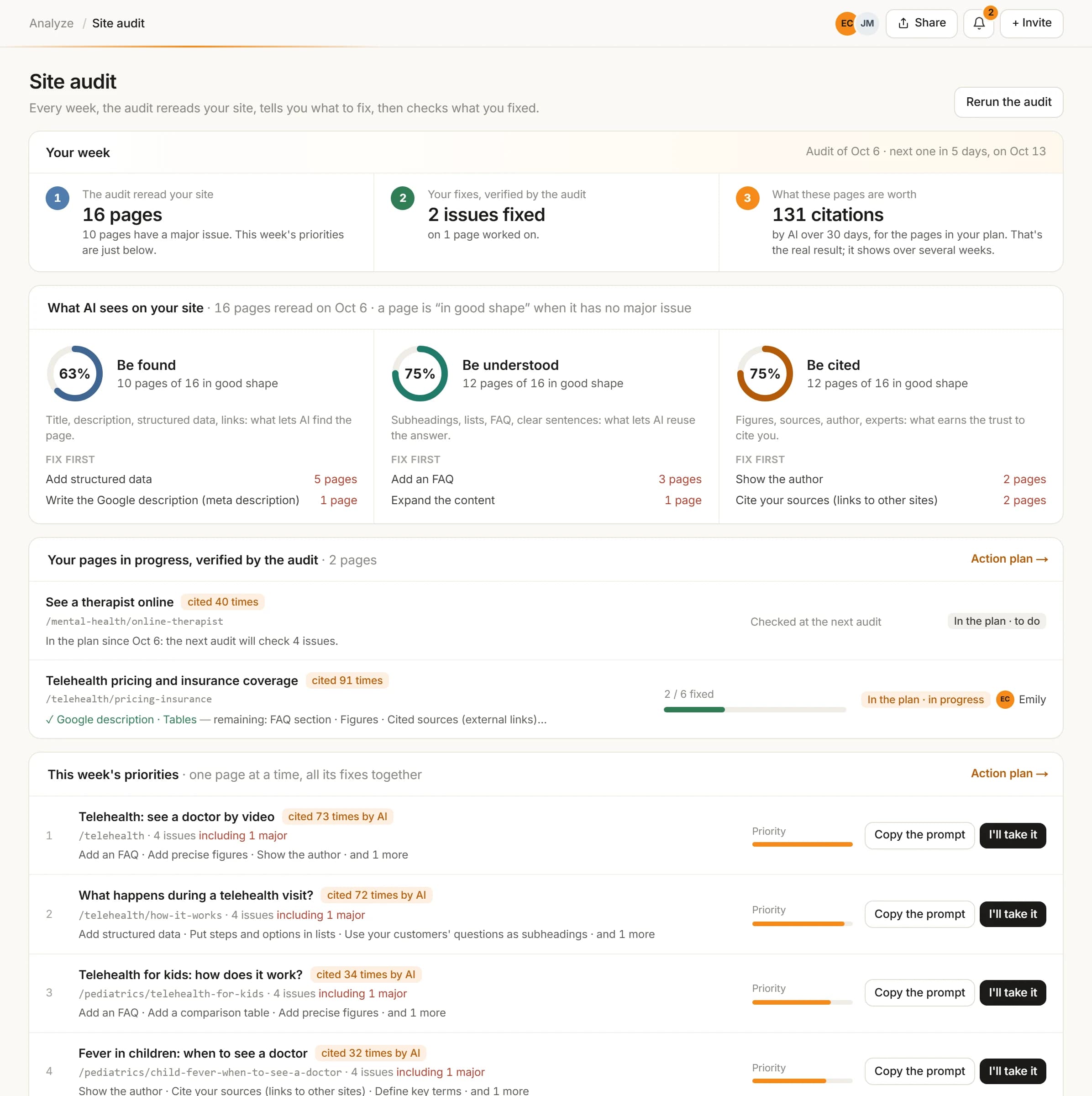
- An audit prioritized by real demand: every audited page carries its Google impressions. A page Google shows often and AI engines never cite moves to the top of the action plan.
- New questions to track (Growth): Atyla spots in Search Console the question-shaped queries you are not tracking yet.
- Google’s AI report, crossed: you import the export of the Generative AI report, and Atyla compares it with its weekly readings of Google’s AI answer.
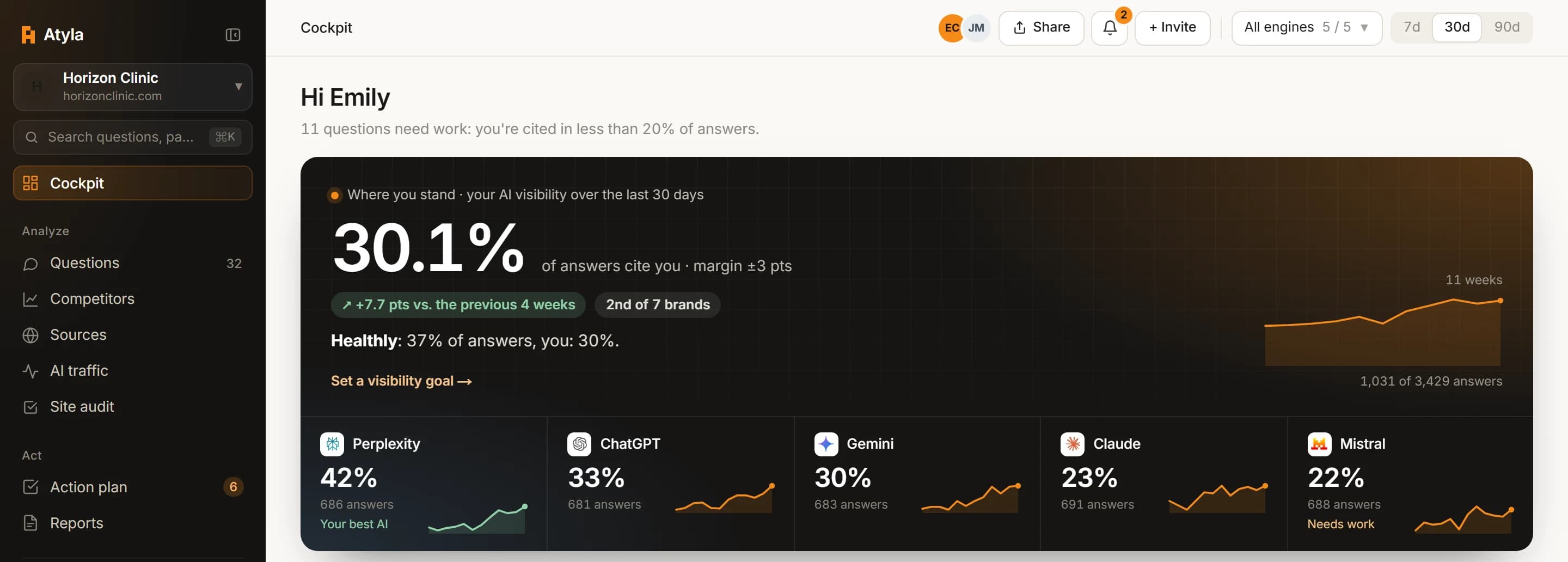
Atyla also combines Google Analytics 4 and Bing Webmaster Tools. Plan details are on the pricing page, and how each number is computed on the methodology page.
How should you investigate differences between queries, clicks and citations?
Choose a page and inspect what each source observed during the same period. Impressions with few clicks could reflect a sufficient answer, an ambiguous title or a different need. Read the query and displayed passage before deciding which change deserves testing on the page or in the tracking panel.
| What you see | What it means | What to do |
|---|---|---|
| Many Google impressions, never cited by AI engines | Google knows the page, AI engines do not reuse it | Rewrite the opening to answer the question in the first sentence |
| Good position, zero clicks on a question-shaped query | Check whether the answer on Google satisfied the need or the snippet was too vague | Rewrite the title and description with the words of the question |
| Page given as a source by AI engines, few Google impressions | A page useful to AI engines, barely visible on Google | Keep it up to date, do not delete it, track its questions |
| Long question in Search Console, not tracked | Real demand you are not measuring | Add it to your tracked questions |
Fictional example. A rental listing appears for the question “Is a child seat included?” Its snippet describes only the bicycle range. Before changing the title, check local seat availability and consider whether the search result already answered the question. Clarify any surcharge on the listing and save the revision date.
To go further on traffic itself, read how to track AI traffic in Google Analytics 4. For measuring the answers: how to measure AI visibility and citations.
How do you connect Google Search Console to Atyla with read access?
Open the Search Console integration in Atyla and choose a Google account with access to the property. Select the domain or URL prefix that covers the published pages. Compare a familiar page against its Search Console report to check the property, dates and arrival of data in the workspace.
- Open Settings › Integrations in your Atyla workspace.
- Click Google Search Console and grant read access.
- Choose the property, meaning the site to track.
- Let Atyla collect your data: the first numbers arrive within the day.
Two limits to know. Google does not pass on queries that are too rare, so per-query totals can be slightly lower than in Search Console. The Web search type in the Performance report includes clicks and impressions from Google AI Overviews and AI Mode. An individual row does not identify which clicks came from a summary.
How do you import Google’s generative AI impressions?
Export the Pages view from the generative AI report in Search Console, then import its CSV into Atyla. Save a dated copy with the filters used. Match the canonical addresses against pages found in tracked answers. Impressions with no matching question may suggest a gap in the panel.
- In Search Console, open Performance › Generative AI.
- Pages tab, then Export › CSV.
- In Atyla, click Import the Google report.
Atyla then sorts your pages into three groups:
- Seen by Google, outside your questions: Google already shows these pages in its AI answers, on searches you do not track. These are questions to add.
- Seen by Google and a source in our readings: real impressions, and the page is given as a source on your tracked questions.
- A source in our readings, with no impression: rare searches, or an export from another period.
Bing’s AI Performance report is imported the same way.
How should you interpret a score beside Google search data?
First identify what the score measures. An audit score describes a page and a mention rate describes a collection of answers. Keep sample size, market and dates beside the rate. To assess a correction, also read the actual claim and its linked source in a subsequent answer.
- Compare yourself with your competitors, on the same questions and the same period.
- Compare yourself with your own history, over periods of the same length.
- In AI answers, look at the share of answers that cite you, with its margin of error.
- Be wary of a score out of 100 with no published method.
Our glossary details the AI visibility score and share of voice.
Which documentation explains the exports used in this workflow?
Use Search Console Help for Google’s report columns, Bing’s documentation for Microsoft’s coverage and Google Analytics Help for visit classification. Record the report name alongside every export. Two files can each contain a page column while describing different events, so preserve the definition when combining their figures.
- Google Search Central, AI features and your website. AI Overviews and AI Mode counted in the Performance report, “Web” search type.
- Google Search Central, guide to optimizing for generative AI search. eligibility rules, Generative AI performance report.
- Search Console Help, Performance report. clicks, impressions, click-through rate, average position.
- Google, Search Console API (Search Analytics). the API tools use to read your data.
- Microsoft Bing, AI Performance in Bing Webmaster Tools. announcement of February 10, 2026: citations, cited pages, grounding queries.
- Google Analytics Help, known bot-traffic exclusion. traffic from known bots is excluded automatically.
What should you check when two reports appear to disagree?
Verify the property, canonical address and date range, then distinguish assistant answers from Google impressions. An absence in an export may result from low volume or an active filter. The questions below cover access permissions, available data and the limits of joining observations from different systems.
- Which AI visibility tools connect to Google Search Console?
- Atyla connects to Google Search Console in read-only mode, from the Starter plan (€89/mo excl. VAT). It shows your Google clicks, impressions and position next to the share of ChatGPT, Perplexity and Gemini answers that name your brand or link to your site. On Growth (€199/mo excl. VAT), it also spots in Search Console the questions you are not tracking yet. For other tools, check the integrations list on the vendor’s site.
- Does Search Console show traffic from ChatGPT?
- Search Console covers Google Search. In GA4, use the available channel or referring source to identify sessions attributed to an assistant. A visit that loses its referrer may remain unattributed. Observe answers without visits separately by saving their text and links.
- Does Search Console separate AI Overviews from the rest?
- The Web report supplies clicks and impressions across Google Search. The generative AI report shows impressions of links to your site in AI Overviews and AI Mode, with views by page, country and device. Google notes that a property with insufficient generative AI impressions may not see the report.
- Does Atyla modify my Google Search Console data?
- No. The connection uses Google’s official API in read-only mode. Atyla reads your clicks, impressions, queries and pages, and cannot change anything in your property.
- Why do I get impressions on Google but no citations in AI answers?
- Because they are two different measurements. You can rank well on Google and be absent from ChatGPT’s answers, which rely on other sources and rephrase the question. That is what the comparison brings out: the topics where Google already shows you, and where AI engines do not cite you yet.
- What is a good visibility score?
- There is no universal threshold: every tool computes its score its own way. A visibility score is read by comparison, with your competitors on the same questions and with your own history. In AI answers, prefer a share of answers that cite you, with its margin of error, to a score out of 100 with no published method.